ProfitGuru Review: Is It Worth Using for Amazon FBA?
ProfitGuru is worth considering if you sell on Amazon US and want product, keyword, brand, seller and supplier research in one lower-cost platform. It is especially interesting for wholesale sellers because Bulk Analysis can turn a supplier file into a filtered product shortlist and purchase order. It is less suitable for international marketplace research, multi-user teams or sellers who need a full PPC and operations suite.
Quick verdict
ProfitGuru offers a practical set of Amazon research tools from $25 per month. Starter is suitable for occasional research, while Professional is the serious working plan for larger catalogues, unlimited keyword lookups, exports and Market Intelligence.
| Review point | Verdict |
|---|---|
| Best for | Amazon US wholesale, product research and lean private-label validation |
| Main strength | Broad research coverage at a comparatively accessible price |
| Standout workflow | Supplier catalogue analysis and purchase-order building |
| Main limitation | Amazon US only at the time of review |
| Team limitation | One user per account |
| Paid plans | Starter $25/month; Professional $50/month |
| Purchase protection | Seven-day money-back guarantee |
| Coupon | AMZNINJA50OFF for 50% off or AFFMAVEN30 for 30% off, subject to checkout confirmation |
What is ProfitGuru?
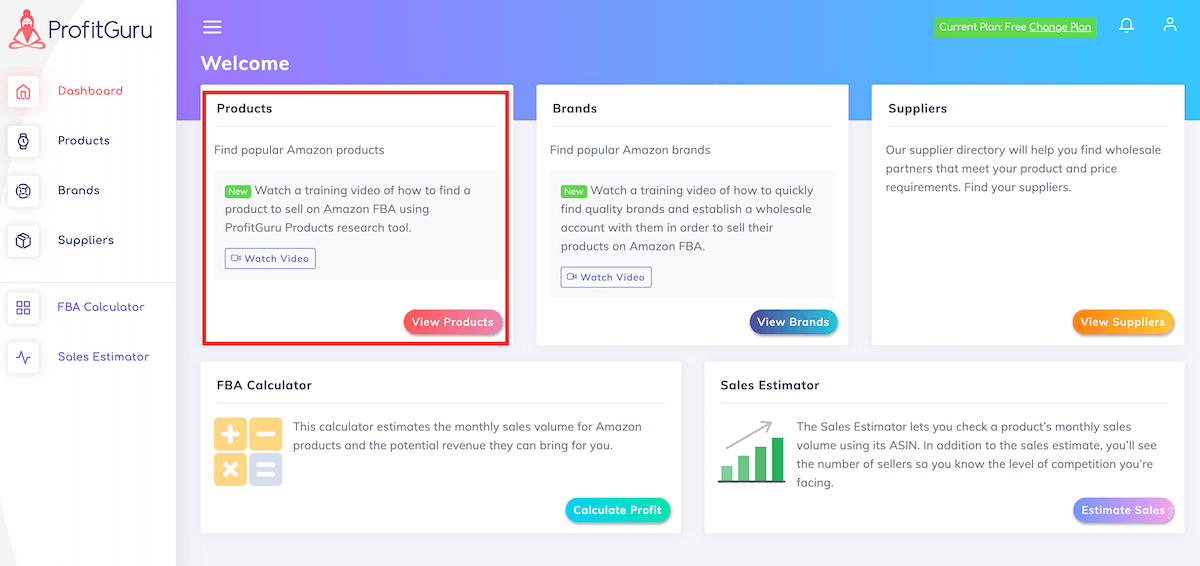
ProfitGuru is an Amazon seller research platform. It combines databases for products, brands and sellers with keyword tools, market validation, supplier-list analysis, calculators, an Amazon Chrome extension and an AI Assistant connected to platform data.
That combination matters because Amazon research rarely happens in a straight line. A seller may begin with a keyword, inspect the top listings, check seller competition, calculate FBA fees, assess a brand and then match a distributor file to Amazon. ProfitGuru tries to keep these jobs in one environment.
The platform should not be confused with business-management software. It is not primarily an inventory, accounting, repricing or end-to-end PPC system. Its centre of gravity is finding and validating opportunities.
Who should use ProfitGuru?
Wholesale sellers
Wholesale is the clearest use case. ProfitGuru can accept a CSV or Excel catalogue containing UPCs, SKUs or ASINs, match lines to Amazon listings and calculate profit and ROI when supplier cost is included. Sellers can filter by demand, BSR, competition and other criteria, then add shortlisted products to a purchase order.
This does not replace supplier due diligence, invoice checks, brand approval or a test order. It can, however, reduce the hours spent checking obviously weak lines one at a time.
Private-label sellers
Private-label sellers can combine Product Database, Reverse ASIN, Suggested Keywords and Market Intelligence. The aim is to move from “this niche looks popular” to a more disciplined question: is demand strong, is competition manageable, and do the existing listings leave a genuine quality gap?
ProfitGuru is useful at the validation stage. It does not remove the need to read reviews, calculate landed cost, inspect patents and trademarks, obtain samples or run a launch forecast.
Online and retail arbitrage sellers
The Chrome extension puts profitability, fees, demand and competition data closer to the Amazon product page. That makes it relevant for quick screening. High-volume arbitrage businesses may still need specialised sourcing automation or scanning tools.
Agencies and larger teams
The feature set may help an agency analyst, but ProfitGuru currently states that each account supports one user. Businesses needing permissions, separate seats and shared audit trails should treat that as a significant limitation.
How we evaluated ProfitGuru
This review separates verifiable product facts from performance claims. We checked public pricing, product pages, tool limits, marketplace coverage, guarantee wording and the documented supplier workflow. We then evaluated whether those functions solve real Amazon seller jobs.
For a hands-on update, use the same benchmark every quarter:
- Select ten ASINs with known Seller Central outcomes.
- Compare fees and sales estimates with Amazon and your own data.
- Upload a 100-line supplier file containing strong, weak and deliberately mismatched items.
- Record matching quality, rejected rows and time to a usable shortlist.
- Run three competitor ASINs through keyword research.
- Note where the tool changed a decision and where manual verification remained essential.
Do not publish a made-up accuracy percentage. Report the sample size, date, marketplace and exact method.
| Area | Editorial score | Reason |
|---|---|---|
| Wholesale workflow | 9/10 | Catalogue analysis and PO building are direct |
| Product research | 8/10 | Strong filters at an accessible price |
| Keyword research | 7.5/10 | Useful, though larger suites go further |
| International coverage | 4/10 | Amazon US focus is restrictive |
| Team readiness | 4/10 | One user per account |
| Price-to-feature value | 9/10 | Two clear plans from $25 monthly |
These scores represent workflow fit, not guaranteed accuracy.
ProfitGuru Product Database
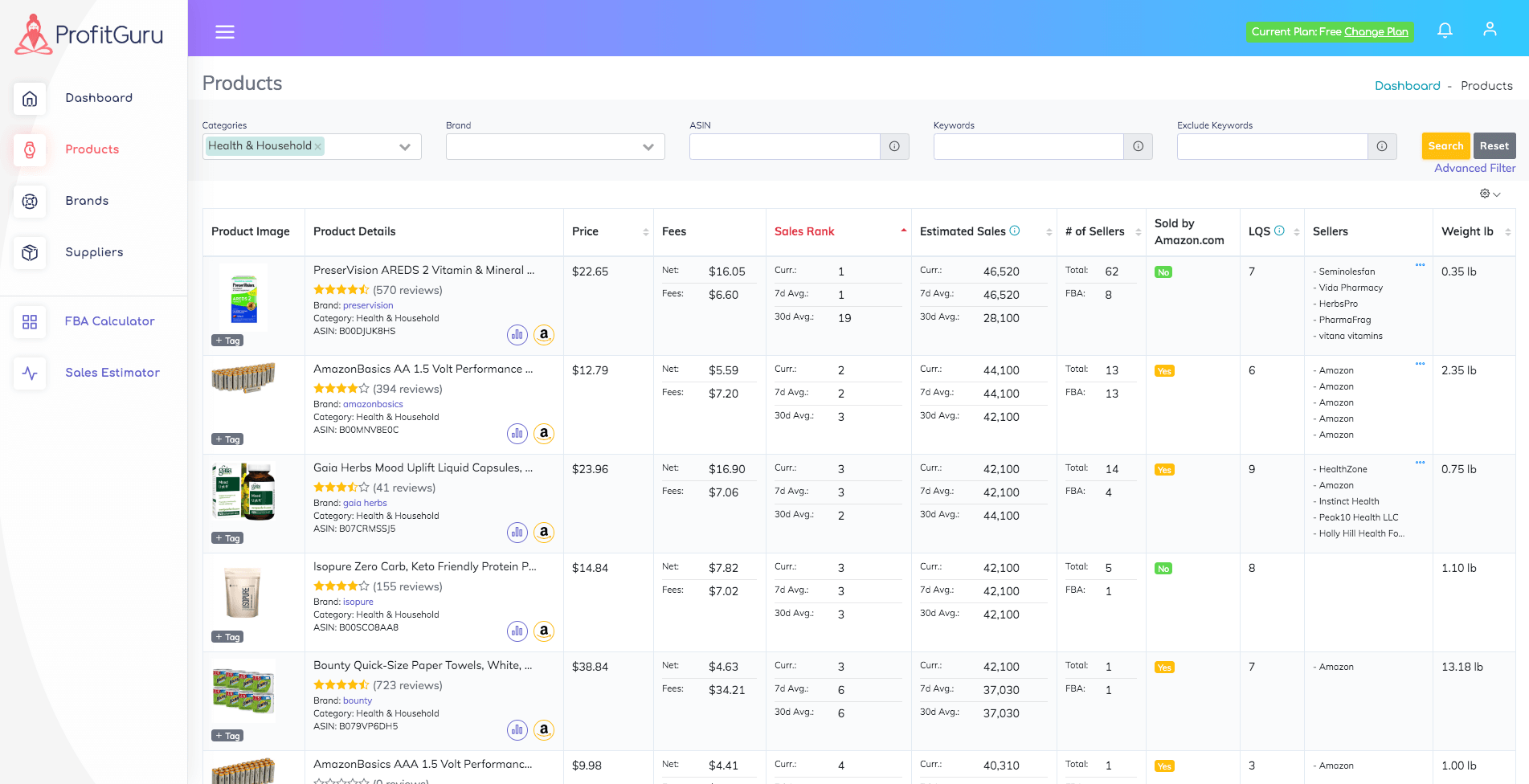
The Product Database is designed to surface items with evidence of demand rather than force sellers to search the entire Amazon catalogue blindly. ProfitGuru says the focused database contains more than 2.5 million popular products, while its broader data covers a much larger catalogue.
Useful research fields include sales estimates, Bought Past Month data, rank, price, reviews, competition and profitability inputs. Filters allow a seller to build a repeatable screen, such as:
- Price between $25 and $70
- Bought Past Month above a minimum level
- Fewer than a chosen number of competing sellers
- Amazon not present on the offer
- Weight low enough to keep fulfilment fees sensible
- Review count and rating within a chosen range
The database produces candidates, not guaranteed winners. Estimates should be cross-checked against price and rank history, listing quality, seasonality and the economics of your actual source cost.
Starter currently returns 50 results per search. Professional provides unlimited product results. This is one of the clearest upgrade triggers for sellers who research daily.
Brand and Seller Databases
Brand-level research helps wholesale sellers answer questions that a product list cannot. Is the brand crowded with third-party sellers? Does Amazon compete directly? How broad is the catalogue? Does the brand appear to support a stable resale opportunity?
The Seller Database works from the other direction. It can help identify how competing sellers build their catalogues and which brands or products appear repeatedly.
These databases are valuable for lead generation, but they should not be used to send generic outreach at scale. A useful wholesale pitch requires a real business case, resale documentation and a clear reason the brand should add another account.
Bulk Analysis and supplier sourcing
Bulk Analysis is ProfitGuru’s most differentiated workflow. The current tool accepts supplier spreadsheets, matches products to Amazon and displays price, fees, rank, estimated sales, competition and demand. More than 15 filters can be applied, including ROI, profit, sales rank, seller count, weight and hazmat status.
The workflow is simple:
- Upload a supplier file with identifiers and costs.
- Review the Amazon matches and reject uncertain mappings.
- Apply a conservative profitability screen.
- Inspect price history and seller competition for survivors.
- Check restrictions, MOQ, MAP and brand risk.
- Add approved items to a purchase order.
- Set quantities and export or print the PO.
Starter stores up to 1,000 UPCs. Professional raises capacity to 100,000. The limit is storage capacity across supplier files, not just the size of one search. Stored product data is refreshed, and removing old files frees capacity.
Our ProfitGuru wholesale sourcing guide provides a complete operating process.
Keyword research tools
ProfitGuru includes Reverse ASIN, Suggested Keywords and Keyword Tracker.
Reverse ASIN reveals terms associated with a competitor listing. The current tool can include several competing products, show search-volume trends and filter words to include or exclude. Starter allows five lookups per day; Professional removes that daily lookup limit.
Suggested Keywords helps expand a seed phrase. Keyword Tracker follows organic positions over time, with 25 tracked keywords on Starter and 1,000 on Professional.
This is enough for research and monitoring, but sellers who need advanced listing building, extensive PPC automation and broad multi-market keyword operations may prefer a larger suite such as Helium 10.
Market Intelligence
Market Intelligence is included only with Professional. It is designed for keyword-led niche validation. A seller can start from category trends or a specific term, then review search demand, competition, title density and the leading organic listings.
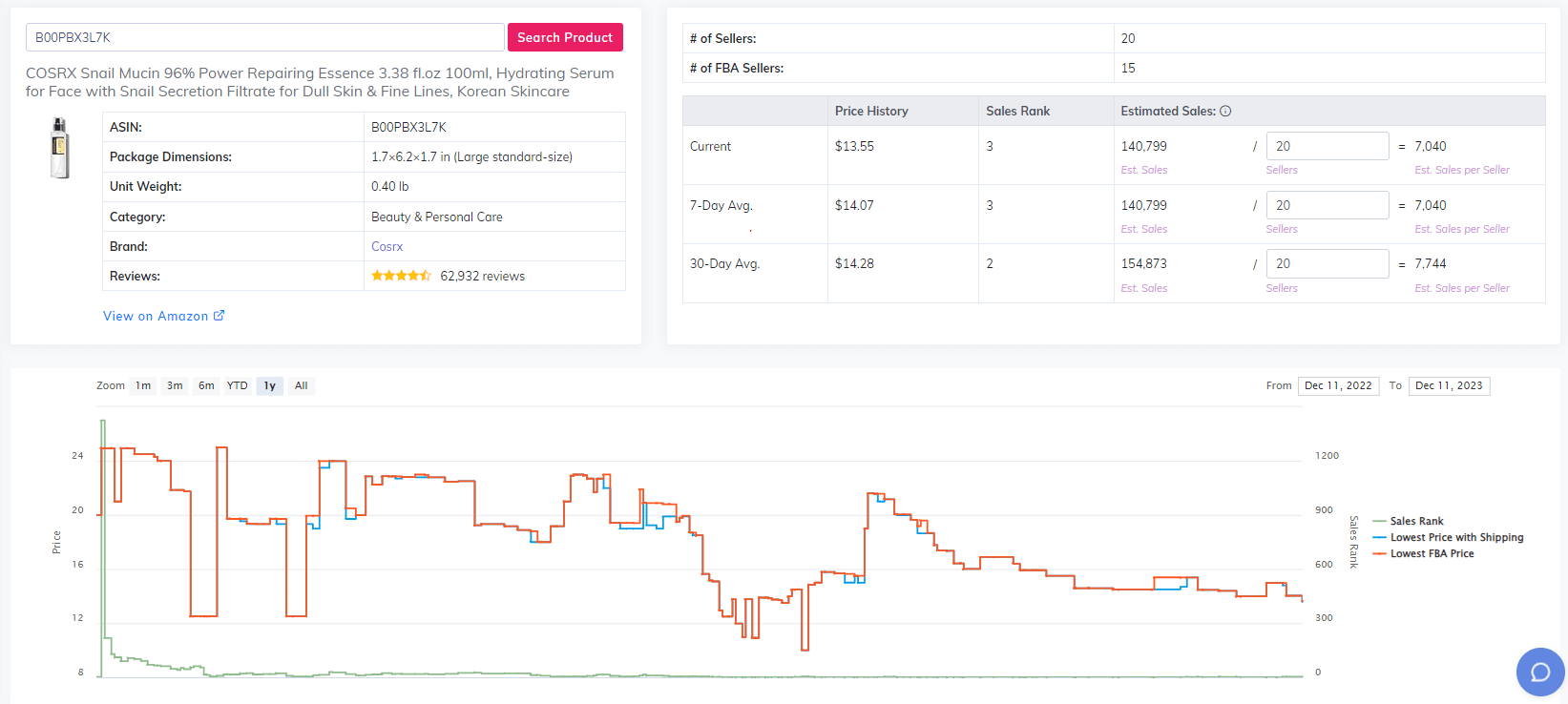
The useful part is the shift from a single ASIN to market structure. A product with attractive estimated sales may still sit in a niche where one brand dominates, review barriers are too high or demand is falling. Market Intelligence gives Professional users another layer before inventory is ordered.
ProfitGuru AI Assistant
Most general AI tools can explain FBA, but they do not automatically know the live product or keyword data inside a seller platform. ProfitGuru positions its Assistant as context-aware and able to use data from its tools.
Starter includes ten requests per day; Professional includes 100. Good uses include summarising a research result, highlighting risks, comparing candidates and suggesting the next check. Poor use is asking AI to make the final buying decision with no review of fees, history, restrictions or supplier terms.
Treat the Assistant as an analyst, not an inventory buyer.
Chrome extension and free tools
ProfitGuru says its Chrome extension is available free without a paid subscription. It brings product data and profit calculations onto Amazon pages, including fees, sales estimates, seller competition, eligibility signals, brand information, search terms and Keepa charts.
The free FBA Calculator and Sales Estimator also let prospective users test parts of the research approach before paying. The Chrome extension review explains what belongs in the browser and what requires the full dashboard.
ProfitGuru pricing and value
| Plan | Monthly price | Annual equivalent | Best fit |
|---|---|---|---|
| Starter | $25 | $20/month, billed annually | Light research and small supplier files |
| Professional | $50 | $40/month, billed annually | Daily sourcing and serious keyword work |
Starter is not a crippled demo. It includes core databases and tools, but usage limits will shape the experience. Professional earns its price through higher capacity, unlimited product results and keyword lookups, Market Intelligence and exports.
Use code AMZNINJA50OFF for the advertised 50% partner discount (or AFFMAVEN30 for 30%) and verify the final total at checkout. Our ProfitGuru coupon page has redemption steps, while ProfitGuru pricing contains the complete limit table.
What ProfitGuru does well — and where it falls short
Strengths
- Combines product, brand, seller, keyword and supplier research
- Starts at a lower monthly price than broad enterprise-style suites
- Gives wholesale sellers a genuine catalogue-to-PO workflow
- Includes Keepa charts in the browser workflow
- Offers a useful Professional tier without many confusing plan levels
- Provides free tools and a free Chrome extension
- Connects AI assistance to research context
Limitations
- Current research coverage is Amazon US only
- Accounts currently support one user
- Starter limits can interrupt high-volume research
- Not a full PPC, listing-operations and inventory-management suite
- Sales and demand estimates remain estimates
- The seven-day guarantee is not the same as a card-free trial
Is ProfitGuru legit and safe to pay for?
ProfitGuru is a functioning commercial platform with public product pages, pricing, terms, privacy information and Stripe-secured card processing. That supports legitimacy, but “legit” does not mean every data point will match your Seller Central history.
Use unique login credentials, connect only the access required, review the privacy terms and validate research before committing capital. The seven-day guarantee gives new customers a short window to test fit, subject to the live terms.
ProfitGuru alternatives
ProfitGuru is not the best tool for every seller:
- Choose Helium 10 for a broader suite with listing, operations, education and advertising workflows.
- Choose Jungle Scout for a more established private-label research environment and supplier tools.
- Choose Keepa when price, rank and offer history is the main requirement.
- Choose SellerAmp SAS for a workflow centred on online arbitrage deal analysis.
- Choose SmartScout for deeper brand, seller and category intelligence.
See our best ProfitGuru alternatives for use-case recommendations.
Final verdict
ProfitGuru is a strong-value research platform for Amazon US sellers who want to move from product discovery to supplier analysis without paying for a much larger operating suite. Wholesale sellers get the clearest benefit. Private-label sellers will find useful validation and keyword tools, particularly on Professional.
Start with Starter if you are learning the workflow or researching occasionally. Choose Professional when 50 results, five daily lookups or 1,000 UPCs would slow real work. If you sell outside Amazon US, need multiple seats or want advanced PPC management, compare alternatives before paying.
Frequently asked questions
Is ProfitGuru worth it for beginners?
It can be, especially if a beginner has a defined sourcing method and uses Starter limits carefully. Training and sound unit economics still matter more than software.
Is ProfitGuru good for wholesale?
Yes. Bulk Analysis, supplier-file matching, filtering and purchase-order building make wholesale one of its strongest use cases.
Does ProfitGuru work outside Amazon US?
ProfitGuru’s pricing FAQ currently says Amazon US only, with other large marketplaces planned. Verify coverage if your business sells elsewhere.
Is the ProfitGuru Chrome extension free?
ProfitGuru currently advertises the extension as free without a paid subscription.
Which ProfitGuru plan is best?
Starter suits occasional research. Professional is better for frequent sourcing, large supplier catalogues, unlimited keyword lookups, exports and Market Intelligence.